

 Dec 20,2025
Product managers know the feeling well. A sprint deadline approaches, stakeholders grow restless, and the design needs validation before anyone commits engineering resources. The traditional path forward involves recruiting participants, scheduling sessions, conducting interviews, and analyzing results. By the time usable insights arrive, the window for action has often closed.
User research tools exist to solve this problem, yet many create friction of their own. Useberry has served teams looking for quick prototype testing, but no single platform fits every workflow, budget, or research methodology. Some teams need deeper behavioral analytics. Others require moderated interview capabilities. Many simply need faster turnaround without sacrificing insight quality.
We built Evelance because we saw how much time product and design teams lost waiting for research results. Our platform takes a different approach, one that delivers psychology-backed feedback in minutes rather than weeks. But we also recognize that research needs vary, and the right tool depends on what you are trying to learn and how quickly you need to learn it.
This guide covers 10 platforms worth considering if you are evaluating alternatives to Useberry. We start with Evelance, then move through nine other options, each with distinct strengths and limitations. The goal is to give you enough information to make a decision that fits your specific situation.
| # | Platform | Best For | Starting Price |
|---|---|---|---|
| 1 | Evelance Best alternative to Useberry | Skip recruiting, scheduling, and incentives. Upload URLs, prototypes, or PDFs and get psychology-backed feedback in minutes. 2M+ personas filtered by demographics, job type, and behavior. A/B testing and competitor analysis. Matches recruited participant results 89.78% of the time. | $29.90 for 10 personas |
| 2 | Maze Continuous discovery | Prototype testing with Figma integration. 3M+ participants. Drag-and-drop test builder with AI-powered analysis. | $99/mo (Starter) $15,000/yr (Team) |
| 3 | UserTesting Enterprise research | Moderated and unmoderated testing at scale. 2M+ participants. Video recordings with facial expressions. Live interviews. | ~$30,000/yr starting Avg spend: $50,000/yr |
| 4 | Lyssna Fast unmoderated testing | Five-second tests, first-click, card sorting, tree testing. 690K+ panel across 124 countries. Results in under 24 hours. | Free tier $75/mo (Basic) |
| 5 | Hotjar Behavior analytics | Heatmaps, session recordings, and feedback surveys. See where users click, scroll, and drop off. AI summaries. | Free tier $39/mo (Plus) |
| 6 | UXtweak All-in-one UX platform | Card sorting, tree testing, session recordings. 60M+ panel. $10/participant starting price. | Free tier $708/yr (Plus) |
| 7 | Optimal Workshop Information architecture | Card sorting and tree testing specialists. 17 years of IA expertise. Used by Netflix and Uber. | $208/mo (annual billing) |
| 8 | Userlytics Mixed-method research | Moderated + unmoderated testing. 2M+ global panel. Video capture with automated transcriptions. | $49/user (Pay as you go) $399/mo (Starter) |
| 9 | Lookback Moderated sessions | Live interviews and collaborative observation. Screen, face, and voice capture. AI-assisted analysis. | $149/mo (Team) 60-day free trial |
| 10 | Loop11 BYO participants | Task-based usability testing with your own users. Heatmaps, path analysis, benchmark testing. | $79/mo (3 tests, 10 testers each) |
1. Evelance: The Best Useberry Alternative
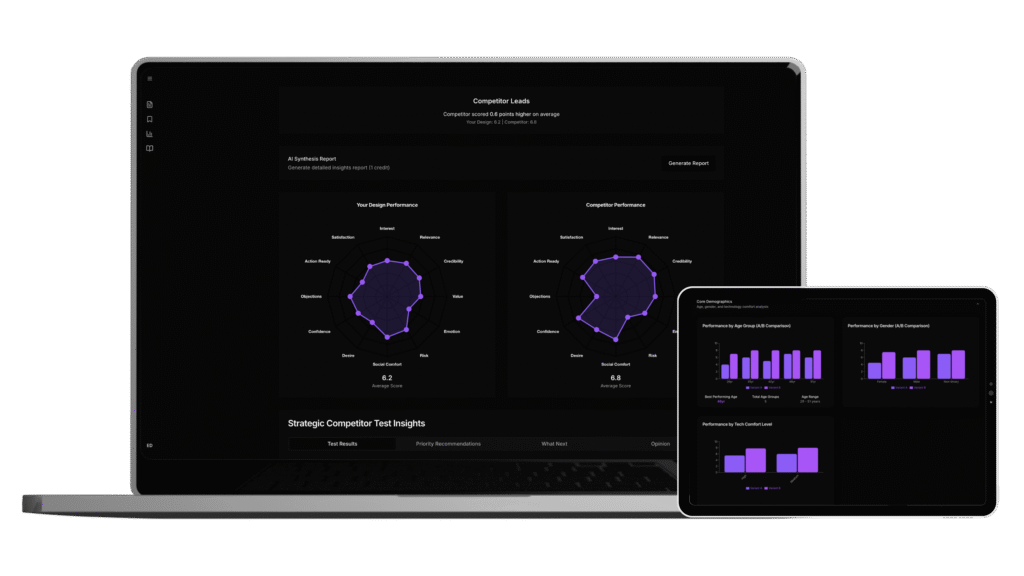
We put ourselves first on this list not out of obligation, but because our platform represents something fundamentally different from traditional user testing tools. Evelance is a predictive user research accelerator that helps product and design teams validate concepts in hours. You upload a live URL or design file, choose a target audience, and run a test that returns psychology scores, persona narratives, and prioritized recommendations.
The difference becomes apparent when you compare timelines. Traditional research costs around $35,000 and takes six weeks. Evelance delivers comparable insights in under an hour, preserving cash for development and keeping projects on schedule.
How Evelance Works
The process starts with our Intelligent Audience Engine, which gives you access to over 1,000,000 personas filtered by demographics, professions, behaviors, and psychological profiles. You can begin quickly with presets like young professionals or budget-conscious shoppers, or describe your ideal group in plain language. Add details such as role, device preference, or purchasing context, and the engine creates predictive audience models matching those traits.
Each persona arrives with authentic backgrounds, personal histories, and behavioral patterns shaped by their circumstances. When we tested Apollo versus Attio pricing pages against 10 B2B SaaS professionals actively evaluating CRM tools, Attio won decisively with an average score of 7.5 out of 10 compared to Apollo’s 6.3. That 19% performance gap was driven almost entirely by psychological factors that have nothing to do with actual product capabilities.
Psychology Scoring
Our platform measures 12 psychological scores including Interest Activation, Credibility Assessment, and Action Readiness. These provide immediate feedback on design effectiveness that goes beyond surface-level responses.
Test personas who respond like rushed parents, stressed workers, or burned customers. Emotional states shaped by life circumstances reveal friction that analytics and surveys miss completely. Every reaction traces back to personal history, motivation, and context so you fix actual problems rather than symptoms.
Test Types Available
You can test single designs, compare two variants, or benchmark against competitors. We accept live websites via URL, PDFs, mobile app screens, and presentation files. The A/B testing capability is particularly useful when you need to see which wins before engineering builds either option.
Our competitor analysis feature tests designs against competitors using predictive models, delivering side-by-side comparisons across all psychological dimensions.
Benefits by Role
- For product managers: Hit deadlines without guesswork. Evelance delivers fast, precise feedback so you can launch products and stay on schedule. Run a test during your morning coffee and have actionable insights before your standup meeting.
- For UX designers: See how users interact with your designs, fix pain points early, and deliver polished, user-approved work that performs. Stop presenting designs to stakeholders with crossed fingers. Walk into every review with data showing exactly how your target audience will respond.
- For marketing professionals: Test creative, messaging, and offers with targeted audiences before spending on ads, ensuring campaigns resonate and convert. Why waste advertising budget on messaging that does not land when you can validate it first?
- For agencies: Back every design recommendation with targeted user feedback, making your work measurable and valuable. Differentiate yourself from competitors by delivering data-driven recommendations rather than subjective opinions.
- For eCommerce teams: Identify shopper friction points and conversion drivers, then optimize your store to turn more visitors into paying customers. Every percentage point improvement in conversion translates directly to revenue.
Pricing
Evelance uses a pay-as-you-go model with no subscriptions. You buy persona packs as you need them, and the per-persona price drops on larger packs. Current pack pricing is $29.90 for 10 personas at $2.99 per persona, $139.50 for 50 personas at $2.79 per persona, $259 for 100 personas at $2.59 per persona, and $717 for 300 personas at $2.39 per persona.
Enterprise plans offer 5M+ Predictive Audience Model Access, On-Demand Audience Generation, Full Platform Access, single tests, A/B tests, competitor analysis, unlimited tests per day, unlimited projects, onboarding and white-glove support, and priority custom feature development.
Results in Practice
Teams using Evelance see an 85% reduction in user research cycles. Setup to insights takes 10 minutes. Each test generates 100+ measurable data points and scores.
Traditional research would take weeks to uncover behavioral insights through interviews. Evelance delivers them in 9 minutes through predictive personas carrying realistic backgrounds, current pressures, and decision-making patterns.
Augmenting Existing Research
Our platform does not replace research. It augments it. By testing early, teams cut unnecessary iterations and walk into live sessions with designs that are sharper, more focused, and ready to be validated.
Look at the weakest scores and read the explanations behind them. Turn those insights into specific interview questions that go deeper into the reasons people hesitated or felt uncertain. By using predictive results as input, interviews become shorter, more focused, and easier to connect back to design changes.
Trial Information
The trial period lasts for 5 full days starting from the moment your access is created. Every trial comes with 10 personas, giving you enough room to run meaningful evaluations and see how results are presented.
2. Maze
Maze has built a strong reputation as a continuous product discovery platform, particularly among teams deeply integrated with design tools like Figma. The platform provides a variety of research tools including prototype testing, card sorting, website testing, feedback surveys, and interview studies. These tools are accessible through a drag-and-drop builder that allows anyone to carry out effective product research.
Core Features
Maze built its reputation on prototype testing. With it you can validate designs and reveal usability issues with actual users in real time, all before a single line of code is written. Prototypes can be imported from popular design tools including Figma, Adobe XD, Sketch, and InVision. You can test up to five variants of a design simultaneously.
Visual reports filtered in real-time can be embedded in your productivity tool to ensure seamless collaboration across the organization. Key features include AI-powered research tools, automated analytics for data-informed decisions, and customizable reports.
Participant Panel
Maze offers more than 3,000,000 participants, which dwarfs some competitors in this space. This large panel enables quick feedback collection when you need external perspectives.
Pricing
Maze offers three different plans. The Starter plan is made for small teams that want to get started with product research, priced at $99 per month with annual billing coming to $1,188 per year. The Team plan assists teams in building user-centric products and costs $15,000 annually or $1,250 monthly.
The Organization plan is custom and crafted upon request. Some internet research revealed that the average price for a Maze subscription at this level is around $12,000 per month. For enterprise-level customers with bigger budgets, this may not be an issue, but for occasional testers or organizations with more limited budgets, there are more affordable options.
Pros
Maze integrates seamlessly with design tools and provides a reasonable starting point for small to medium-sized teams who need to move fast and iterate quickly. It has a number of impressive features like advanced AI analysis, numerous templates, and rapid delivery of testing results.
Cons
Where Maze falls short is in its reporting functionality, limited scaling capabilities, and high price point at upper tiers. Users report instances of test participants not fully committing to tests, with a notable number dropping out or exiting the test prematurely despite compensation. Prototype crashes have also been reported as a recurring issue.
3. UserTesting
UserTesting is one of the most established names in the user research space, known for its Human Insight Platform and extensive global participant network. The platform enables companies to gather real-time feedback on their digital products, websites, and user interactions. It provides remote user testing capabilities with both moderated and unmoderated options.
Core Capabilities
Remote User Testing allows you to conduct moderated or unmoderated tests with participants from around the world. Video Recordings capture user interactions, verbal feedback, and facial expressions during testing sessions. Customizable Test Plans let you create tailored test scenarios and tasks to address specific research questions.
According to their own data, UserTesting has over 2,000,000 active participants on its panel. Such a large testing community allows customers to receive fast feedback, often within one hour. The platform provides a broad range of testing methodologies to gather in-depth qualitative feedback, including moderated and unmoderated usability tests, remote interviews, and surveys.
The Live Conversation Feature allows real-time interviews with participants for in-depth qualitative insights. Advanced analytics tools help researchers and designers understand user behavior, uncover pain points, and validate design decisions.
Pricing Reality
UserTesting follows a customized pricing model, with costs typically beginning at $30,000 annually. However, the average spending for users typically reaches $50,000 annually. Prices range from $15,000 per seat to as high as $60,000 per seat plus usage-based pricing, with some of the largest clients paying well over $1,000,000 per year.
One review mentioned a quoted price of $42,000 per year, a considerable investment for startups and small businesses. Pricing information is not readily available on the website, which has led potential customers to struggle when trying to understand costs upfront.
Pros
UserTesting is worth it for businesses that prioritize user-centered design and want to make data-driven decisions about their digital products. The platform offers rapid, high-quality user feedback that can improve product development cycles, increase user satisfaction, and drive business growth. The user-friendly interface makes it accessible for those new to user research tools.
Compared to single vendor run studies which can cost $25,000 to $30,000, UserTesting can provide lower cost alternatives for comparable research.
Cons
High cost is the primary drawback. For small startups or businesses with limited digital offerings, the cost might be harder to justify, as the volume of insights needed may not align with the pricing structure. The secretive pricing model makes evaluation difficult during the buying process.
4. Lyssna
Formerly known as UsabilityHub, Lyssna has rebranded and expanded its capabilities to become a comprehensive user research platform. The platform provides fast, actionable feedback that allows teams to quickly iterate and improve their designs.
Core Features
Lyssna offers a range of testing tools including five second testing, first click testing, surveys, tree testing, prototype testing with Figma, card sorting, and preference testing.
Navigation testing helps you optimize user flows by asking users to complete specific tasks on a design and tracking their progress. Prototype testing with Figma lets you learn how users interact with your interactive Figma prototypes at every stage of the design process. Card sorting with both open and closed options helps discover how to organize and label your content in a way that makes sense to your audience.
Key features include participant recruitment from a panel of 690,000+ people across 120+ countries and 35+ demographics. Interviews help streamline the entire interview process from planning to transcription. Recordings capture participant audio, screen, and camera during unmoderated tests.
Participant Panel
Access 690,000+ active panelists for on-demand usability testing. The panel covers 124 countries, supports 55 languages, and offers 395+ demographic targeting attributes. Average order completion time is 30 minutes, enabling quick insights.
Pricing
Lyssna has 4 pricing tiers ranging from $0 to $199. A free trial and free version are available.
In terms of participant costs, 1 credit equals $1 unless buying credits in bulk. Panel responses cost 1 credit per minute of test length per panelist response ordered. With the Lyssna panel, recruiting participants costs $1.00 per minute of test duration with no additional fees for demographic targeting. Results typically arrive within hours or minutes.
The platform is notably price-friendly for startups and smaller organizations. Both the free plan and Basic plan starting at $75 per month offer more seats and testing options than comparable plans from some competitors.
Pros
Conducting research studies in under 24 hours is a strong advantage. Lyssna is an excellent unmoderated, quantitative research tool and is building strong capabilities to support qualitative research with a quality participant panel at an affordable cost. The platform is intuitive and easy to use, allowing teams to focus on gaining insights rather than struggling with complex tools.
Cons
Users report that managing multiple studies becomes cumbersome over time, especially when collaborating across teams. There is no native folder or tagging system to organize tests effectively. Integrations with project management tools like Notion, Asana, or Jira are missing, creating manual steps when syncing insights with product roadmaps. Some users also mention limitations in test logic, participant diversity, and live site testing.
5. Hotjar
Hotjar has become synonymous with website behavior analytics, particularly known for its heatmaps and session recordings that visualize how users interact with websites. The platform is now part of Contentsquare alongside Heap.
Product Suite
Hotjar has three products: Observe, Ask, and Engage. Observe visualizes user behavior through recordings and heatmaps. Ask gathers user feedback via surveys and feedback widgets. Engage facilitates direct user interviews and testing sessions.
The Observe product shows where users move, click, and scroll. You can identify what is working and what is not on every page, then combine heatmaps with feedback to answer tough questions about visitor behavior. Watch real user journeys to quickly spot bugs, confusion, and drop-offs. A one-click summary highlights key moments so you can quickly spot issues.
The Ask product helps you create surveys in seconds and get responses in minutes with 40+ templates and an AI survey generator. AI summary reports and sentiment analysis help you quickly understand results.
Pricing Structure
Each of the three products has four subscription tiers: Basic, Plus, Business, and Scale.
Observe pricing: Free with 35 sessions, Plus at $39 with 100 sessions, Business at $99 with 500 sessions, and Scale at $213+ with 500+ sessions plus funnels and API access.
Ask pricing: Free with 20 responses, Plus at $48 with 250 responses, Business at $64 with 500 responses and API access, and Scale at $128 with unlimited responses and targeting.
Engage pricing: Free with 0 interviews, Plus at $39.20 with 3 interviews, Business at $440 with 12 interviews and screeners, and Scale with custom pricing for 20+ interviews and a customer success manager.
The Free plan is a free-forever option designed for small businesses or those starting with user behavior analytics. This plan allows tracking of up to 20,000 monthly sessions and provides access to core features including session replay and unlimited heatmaps with one month of data retention.
Pros
Analysis of verified user reviews shows that Hotjar has a value-for-money rating of 4.6 out of 5, reflecting the platform’s ability to deliver powerful features at an accessible price point. The platform is intuitive and easy to use, with implementation taking minutes to get running. The breadth of features including heatmaps, session recordings, feedback polls, and surveys gives comprehensive insights into customer behavior.
Hotjar is recommended for smaller companies looking for an inexpensive starting place to get feedback from users to improve their website. As your company scales, you can swap out Hotjar for more expensive point solutions where a more advanced tool makes sense.
Cons
The daily session caps and pricing structure can be frustrating for those with high traffic, as Hotjar does not allow for comprehensive data capture on its lower-tier plans. Those on lower-tier plans may find that advanced features necessary for in-depth analytics or user engagement are not available.
6. UXtweak
UXtweak has positioned itself as a comprehensive all-in-one UX research platform with a strong focus on affordability and accessibility. The platform helps teams recruit and manage participants, conduct studies, analyze data, and share insights all in one place. It has been used to craft over 570,000 questions and collect 1.8 million+ responses.
Core Features
The platform includes various research tools such as Card Sorting, Tree Testing, Preference Tests, Five Second Tests, Surveys, and Session Recordings. Card Sorting and Tree Testing are particularly useful for analyzing how users intuitively group content and whether they can find what they are looking for in a site menu.
The platform also focuses on empathizing with users and understanding their needs, thoughts, and feelings through tests that compare design choices and gather direct feedback.
Participant Panel
Recruit globally from a panel of 60,000,000+ users, with participants from 130+ countries and 2,000+ targeting attributes for precise recruitment. Rigorous quality checks and free replacements guarantee reliable feedback.
UXtweak has the lowest price per participant starting at $10, which is 3.9 times cheaper than UserTesting and 4.9 times cheaper than some other platforms.
Pricing Structure
UXtweak is the only platform in this comparison that offers a completely free plan. This plan is ideal for small projects and serves as an opportunity to explore and test all available tools.
Starter Plan is free and suitable for basic testing with access to all features, one active study, and up to 30 monthly responses. Plus Plan costs $708 per year and is ideal for individual researchers, offering 200 monthly responses, unlimited studies, and one-year data retention. Business Plan costs $1,812 per year and is tailored for small to medium businesses, providing unlimited studies, 1,000 monthly responses, and enhanced support. Enterprise Plan starts at $5,000 per year and is customized for larger clients, offering unlimited responses, access to real users, and personalized support.
Recruiting from the panel costs as low as $4 per 15 minutes for a tester.
Pros
UXtweak offers a lot of value with robust testing solutions in a truly all-in-one UX research tool. The platform handles the user panel, incentivization, and recruitment, so you do not have to worry about it. It can be quickly set up and deployed, with an intuitive interface that saves time. Users consistently report a better price-to-quality ratio compared to alternatives.
Cons
There is no live interviews feature. Teams needing moderated interviews have ended up conducting them via Zoom, which adds friction to the research workflow.
7. Optimal Workshop
Optimal Workshop has carved out a specialized niche as the go-to platform for information architecture research, particularly excelling in card sorting and tree testing methodologies. The company has spent 17 years perfecting tools specifically designed for information architecture optimization.
Core Features
Optimal Workshop is a narrowly focused UX testing tool with a laser-like focus on information architecture studies such as card sorting and tree testing. It has recently added more methods including First-Click Testing.
Available tools include tree testing with Figma integration, video, audio, and screen recordings. Understand how users expect your content to be structured and organized through card sorting, tree testing, and session replays. Collect user opinions, preferences, and structured feedback through surveys with branching and display logic plus AI-powered question refinement and analysis.
Interview insights include automated insights, qualitative note taking, and transcript imports. Visualization and analysis of behavior and feedback across all study types includes automated analysis, task results, clickmaps and heatmaps, user paths, and data downloads.
The platform is used by Netflix to organize content libraries, by Uber to structure help documentation, and by thousands of teams who have learned that great user experiences start with intuitive information architecture.
Pricing Structure
Optimal Workshop’s pricing plans begin at $208 per month when paid annually for an unlimited number of studies.
You can purchase Optimal Recruitment either on a pay-as-you-go basis or by buying credits. When you buy larger credit bundles, you receive bonus credits and benefit from a lower price per credit.
Participant Recruitment
A limitation of Optimal Workshop is its participant recruitment process. Unlike some competitors, this UX testing tool does not have a proprietary panel and instead relies on third-party recruitment services. The 239,000,000 participants mentioned on their website is an aggregate from these third-party services, contrasting with platforms that control their own proprietary panels.
Pros
Card sorting and tree testing are the very best UX research methods for understanding how users expect information to be organized. OptimalSort focuses on card sorting studies to organize content, while Treejack conducts tree testing to validate navigation structures. Since they serve complementary purposes, the question is not which is better but which tool matches your current research needs.
Cons
The platform can be expensive for large studies. There is a learning curve for analysis tools. The free tier is limited. Some features require higher tiers. Limited customization options are available at lower price points.
8. Userlytics
Userlytics has established itself as a versatile platform supporting mixed-method UX research with a strong global participant panel. The platform supports moderated usability, unmoderated usability, quantitative and qualitative combinations, card sorting, tree testing, first-click testing, and benchmarking on desktop, mobile, live assets, and prototypes.
Core Capabilities
The clients of Userlytics range from UX designers and UX researchers to product managers, conversion optimization specialists, market researchers, and marketing teams, providing both quantitative and qualitative data.
Userlytics comes with advanced video capture and editing tools that record tests, hyperlinked annotation, automated transcriptions, and highlight reels for both moderated and unmoderated UX testing. The platform uses advanced quantitative metric systems such as time on task and success or failure metrics, rating questions, and more to test products effectively.
The platform helps optimize information architecture by analyzing participants’ mental models as they categorize and search for items. Users can easily launch a moderated UX test or an interview by scheduling a live conversation.
Participant Panel
One of the main strengths of Userlytics is its vast global panel of over 2,000,000 test participants, the strongest international proprietary panel among UX testing tools. This makes Userlytics an excellent solution for participant recruitment. It also supports bringing your own participants or those of third-party panels with advanced features.
Pricing Structure
Userlytics offers a range of pricing plans to accommodate different needs. Quick and Easy Pay As You Go costs $49 per user. Enterprise Pay As You Go costs $69 per user. Starter costs $399 per month. Premium costs $499 per month. Advanced costs $999 per month.
Under Enterprise, Limitless, Premium, and Advanced plans, each Panel Credit is worth $1, offering transparent pricing for any studies you run. This 1:1 ratio makes it easy to understand the exact cost of any service.
The Limitless Plan offers unlimited moderated and unmoderated testing studies at a fixed price, allowing teams to conduct user research without any session restrictions.
Pros
Userlytics provides more cost-effective options for large businesses looking to scale usage of UX research across the enterprise. The platform offers highly customizable plans, allowing businesses to tailor their packages to specific needs, including unlimited accounts and seats, testing options, and extensive participant management features. This flexibility can be advantageous for companies with diverse or evolving testing requirements.
Cons
Userlytics has difficulty finding qualified testers for niche industries. The interface to set up a test or review results can be jarring to the untrained eye.
9. Lookback
Lookback specializes in moderated user research, offering robust capabilities for live sessions, interviews, and collaborative observation. The platform captures the screen, face, and voice of research participants as they interact with digital products.
Core Features
Key features include remote observation, session highlighting, and integrations with recruitment platforms. Lookback aims to make qualitative research accessible, collaborative, and impactful for organizations.
All plans provide access to Lookback’s core research toolkit. You can run all available moderated and unmoderated research methods, conduct stakeholder interviews and set research goals, review and annotate recordings in the integrated video player, use AI-assisted analysis with Eureka, create and tag shareable Findings and Reels, store unlimited session recordings, and invite observers to watch live sessions and comment.
Collaborators are team members with full access to conduct research, view all sessions, generate highlights, and manage projects. They can create studies end-to-end. Guests are temporary viewers of live or recorded content that collaborators elect to share with them.
Pricing Structure
Solo plan includes 10 sessions per year, core features, 24/7 Help Center, and a free 60-day trial. Team plan costs $149 per month and includes 100 sessions per year, core features, unlimited collaborators, and 24/7 Help Center. Insights Hub costs $4,128 per year and offers 300 sessions per year, core features, security self-assessment, and priority support. Enterprise has custom pricing with unlimited sessions, core features, unlimited observers, and a dedicated customer success manager.
The trial runs for 60 days and includes up to 5 sessions, moderated or unmoderated, so you can evaluate Lookback in your workflow. Recordings are retained for 30 days post-trial to give you time to upgrade without losing data.
Pay-as-you-go pricing is $49 per participant for all paid plans.
Pros
This tool makes it easy to smoothly run a research session with a team. Everything is in one place. Recording, note-taking, and comments are all in the interface. With the current pricing, you can invite your whole team without worrying about costs or licenses.
You will no longer get fewer valuable features on cheaper tiers, only less usage. The value exchange is now based on volume of research and need for insights. The platform does not limit the number of projects or types of research.
Cons
Lookback requires a Chrome plugin, and users have to install it for the platform to work. Some users do not use Google Chrome, making it awkward to ask them to install something on their machine. The workaround is to use Zoom and Lookback at the same time, but the person recording cannot take notes in Lookback simultaneously.
Videos cannot be uploaded to the platform. Lookback only offers plans with annual commitments, which may limit flexibility for some teams.
10. Loop11
Loop11 rounds out this list as a user testing platform focused on providing accessible testing capabilities with bring-your-own-participant flexibility. You need to provide your own users and reward them yourself. Pricing starts at $79 per month for three user tests with up to 10 of your own testers per test.
Core Capabilities
Loop11 offers a straightforward approach to usability testing, allowing organizations to test websites, apps, and prototypes with their own recruited participants. The platform provides task-based usability testing, allowing researchers to set up specific tasks for participants to complete while tracking metrics like task completion rates, time on task, and click paths.
The platform is particularly well-suited for organizations that already have access to their target users through customer databases, email lists, or other recruitment channels. By not requiring purchase of panel participants, Loop11 can be cost-effective for teams with established user communities.
Key Features
Key features include heatmaps showing where users click during tasks, path analysis visualizing how users move through sites, and benchmark testing to compare performance against industry standards. The platform supports both moderated and unmoderated testing methodologies.
Pricing and Considerations
The pricing structure assumes you have access to your own participants. This makes it a good fit for companies with existing customer relationships who want structured usability testing capabilities without paying for external panel access. For teams without established participant pools, the lack of integrated recruitment may create additional friction in the research process.
Choosing the Right Platform for Your Needs
Selecting the right user research platform depends on your specific circumstances. Several factors should guide your decision.
Speed Requirements
If you need insights within hours rather than weeks, predictive platforms like Evelance deliver results in minutes. Traditional research would take weeks to uncover behavioral insights through interviews. Evelance delivers them in 9 minutes through predictive personas carrying realistic backgrounds, current pressures, and decision-making patterns.
Budget Constraints
Platform costs vary dramatically from free tiers to six-figure enterprise contracts. UserTesting prices range from $15,000 per seat to $60,000 per seat. Evelance offers credit packs starting at $29.90. UXtweak provides free plans for smaller projects. Lyssna keeps costs at $1 per minute of test duration.
Research Methodology
Some platforms excel at specific methods. Optimal Workshop dominates information architecture research. Lookback specializes in moderated sessions. Hotjar focuses on behavioral analytics. Evelance provides predictive psychological insights. Maze excels at prototype testing.
Team Size and Collaboration
Consider how many team members need access and how insights will be shared across your organization. Some platforms charge per seat while others offer unlimited collaborators. Lookback now lets you invite your whole team without worrying about costs. Userlytics offers unlimited seats on certain plans.
Participant Access
Do you need access to external participant panels, or will you recruit your own users? Panel sizes range from 690,000 at Lyssna to over 60,000,000 at UXtweak to unlimited predictive personas at Evelance. Loop11 assumes you bring your own participants entirely.
Integration Requirements
If your design workflow centers on Figma, platforms like Maze and Lyssna offer direct integrations. If you work primarily with live websites, Hotjar and UXtweak provide robust options.
The Path Forward
Your time should go into building, not waiting. Research should be within reach regardless of budget. At Evelance, we believe that every product decision should be informed by user insights rather than delayed by them.
Our platform does not replace traditional testing. It makes every test more efficient, more targeted, and substantially less expensive. By combining Evelance’s capabilities with other testing infrastructure, organizations typically achieve 30% to 50% reduction in their user testing expenses while improving research velocity and insight quality.
The teams that succeed are the ones that understand their users deeply, iterate quickly based on real feedback, and launch with confidence. The best tool is the one that helps you achieve that goal given your specific constraints and research needs.
Ready to see how predictive user research can change your workflow? Get 5 days of access to test your own projects with predictive audiences. Your trial unlocks all core features and access to over 1,000,000 predictive audience models with psychology scoring. Most teams wait weeks to validate design choices, only to learn what they could have known in a day.