

 Dec 18,2025
User research teams often spend more time managing their tools than using the insights those tools produce. Dovetail built a solid reputation as a research repository, but the complaints have grown louder over the past year. Pricing that balloons as teams scale. AI tagging that requires constant correction. Export limitations that trap years of research inside a single platform. These problems push teams to search for something better.
The tool comparison below includes platforms across the user research category, from repositories to predictive research accelerators. Each serves a different purpose, and the right choice depends on how your team works and what bottlenecks slow you down most.
This guide breaks down the 10 strongest Dovetail alternatives with assessments of their strengths, weaknesses, feature sets, and pricing structures.
1. Evelance – The Best Dovetail Alternative
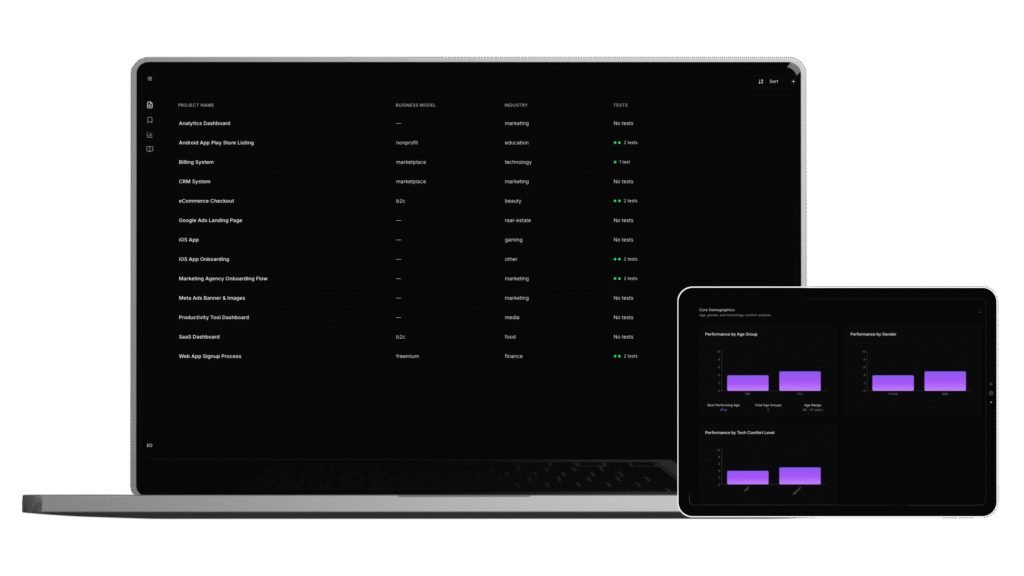
Evelance takes a different approach to user research. Instead of storing and organizing research after the fact, our platform predicts user behavior before you ship. Product and design teams use Evelance to validate concepts in hours rather than weeks, without the logistics of recruiting participants or scheduling sessions.
What Makes Evelance Different
Traditional research follows a pattern: recruit participants, schedule sessions, conduct interviews, transcribe recordings, analyze data, synthesize findings, present results. This process takes 4 to 6 weeks on average and costs thousands of dollars per study. Evelance compresses that timeline to under an hour.
The platform runs on over 1.8 million personas models built from real behavioral data. These models carry demographic information, job characteristics, decision-making patterns, and psychological profiles. When you run a test, the personas respond based on absorbed behavioral patterns from public data sources. They arrive with context, a simulated day already behind them, opinions already formed.
Pros
- Validation happens in hours instead of weeks
- No participant recruiting or session scheduling required
- Predictive audiences built from real behavioral data respond with psychological accuracy
- Prioritization output tells you which fixes will have the highest conversion impact
- Results come formatted for executive communication without requiring translation
- Trial access includes all core features plus access to the full predictive audience library
Cons
- Teams accustomed to live interviews may need time adjusting to predictive methodology
Features
The AI analysis reads your test results and produces prioritized recommendations you can act on the same day. No synthesis meetings. No waiting for researchers to process recordings. The output explains performance in language executives understand, converting psychological scores into business implications.
Custom persona generation lets you build audience models that match your target users. Test subscription tiers, payment models, and pricing psychology before committing to public pricing. Identify conversion barriers before launch rather than discovering friction after spending budget on traffic.
Pricing
Evelance offers a 5-day trial to test the platform on your own projects. Paid plans scale based on usage, with pricing structured for startups and growth-stage companies who need validation without enterprise budgets.
Who Should Use Evelance
Product managers defending feature priorities with behavioral data rather than debating opinions. Ecommerce teams identifying conversion barriers before launch. Startups validating demand and pricing without burning runway on weeks of recruiting. Designers testing visual trust with objective measures. Agencies winning client approval with conversion psychology evidence.
2. Notably
Notably positions itself as an all-in-one user research platform with AI embedded across the qualitative research workflow. The platform handles transcription, tagging, clustering, and insight generation, plus outputs like journey maps, storyboards, and visual reports.
Pros
- AI learns your tagging patterns and improves suggestions over time
- Sentiment analysis reveals positive and negative attitudes across entire studies
- Transcription works across 30+ languages and accents
- Workflow automation through Posty, the built-in AI assistant
- Templates help standardize outputs across research projects
Cons
- AI credits limit usage on lower-tier plans
- Automation quality depends on consistent tagging discipline from your team
- Learning curve for setting up effective automated workflows
Features
Notably automates transcription, highlighting, and tagging when new interviews arrive. The sentiment analysis tool processes full studies to surface emotional patterns. Branding options let you customize reports for stakeholder presentations.
Pricing
Plans range from $50 to $400 per month based on viewer count and transcription hours. The Pro plan runs $40 monthly with 50 AI credits. Teams pay $300 monthly for 200 AI credits. Enterprise pricing is custom with 400 AI credits included.
3. Condens
Condens appeals to teams who want Dovetail-style workflows without the complexity. The interface prioritizes simplicity, making qualitative data analysis accessible for researchers without extensive tool training.
Pros
- Split-screen feature allows tagging while watching recordings
- Lower learning curve than Dovetail
- More affordable pricing for small teams
- Clean interface reduces onboarding time
Cons
- Transcription struggles with multilingual content
- Fewer AI-powered features than competitors
- Limited integration options compared to larger platforms
Features
The platform handles research storage, structuring, and analysis with collaboration tools for sharing findings across teams. The straightforward tagging system works well for teams without dedicated research operations staff.
Pricing
Condens positions itself as a budget-friendly alternative with pricing tiers designed for smaller teams and growing organizations.
4. EnjoyHQ
EnjoyHQ, now part of UserTesting, centralizes customer insights and user research data in one location. The platform integrates with customer support systems, NPS tools, and CRM platforms to pull feedback from multiple sources.
Pros
- Comprehensive free plan with unlimited read-only users
- Strong integration ecosystem including Slack, Zapier, Trello, and Jira
- Transcription with searchable segments and tagging
- Data visualization tools built in
- Taxonomy manager for organizing research at scale
Cons
- Paid plans start at $1,000 per month, a steep jump from free
- User interface has a learning curve
- No screen recording capability
- Email integration remains limited
Features
The free tier includes 2 admin seats, unlimited research projects, unlimited uploads for text, images, and attachments, unlimited transcriptions, and video editing features. Integrations connect with UserZoom, cloud storage platforms, and project management tools.
Pricing
Free plan available with generous limits. Paid plans begin at $1,000 monthly, targeting enterprise teams with larger budgets and integration needs.
5. Aurelius
Aurelius functions as a dedicated user research repository focused on helping teams organize qualitative data and share insights across organizations. The platform competes directly with Dovetail on core repository features.
Pros
- Purpose-built for research data organization
- Collaborative features for insight sharing
- Focused functionality without feature bloat
- Straightforward setup for new teams
Cons
- Less AI automation than newer competitors
- Smaller feature set limits advanced use cases
- Integration options more limited than enterprise platforms
Features
Research storage, analysis tools, and collaboration capabilities designed specifically for qualitative data. The platform handles the core repository functions without expanding into adjacent categories.
Pricing
Pricing tiers scale with team size and storage requirements.
6. Grain
Grain serves teams conducting remote user interviews who need to capture, transcribe, and share key moments from video calls. The platform specializes in conversation intelligence rather than full repository functionality.
Pros
- Strong video clip sharing for stakeholder communication
- Quick highlight creation from longer recordings
- Integrates with common video conferencing tools
- Lightweight compared to full repository platforms
Cons
- Limited as a standalone research repository
- Less suited for teams managing large research archives
- Analysis features focused on individual conversations rather than cross-study synthesis
Features
Meeting recording, transcription, and clip sharing. The platform excels at pulling specific moments from interviews and distributing them to stakeholders who lack time to watch full sessions.
Pricing
Plans scale based on recording volume and team size.
7. Productboard
Productboard operates as a product management platform that incorporates customer feedback and research insights into roadmap decisions. The tool bridges research and product planning rather than serving as a pure research repository.
Pros
- Connects research insights directly to feature prioritization
- Built for product manager workflows
- Roadmap alignment tools help communicate priorities
- Customer feedback aggregation from multiple channels
Cons
- Not designed as a research repository
- Limited qualitative analysis capabilities
- Research teams may find the product management focus limiting
Features
Customer feedback collection, feature prioritization frameworks, and roadmap communication tools. Research insights flow into product decisions rather than sitting in separate systems.
Pricing
Pricing tiers based on team size and feature access.
8. Userbit
Userbit targets UX researchers and product teams with repository and analysis capabilities. The platform covers research storage, analysis workflows, and cross-team sharing.
Pros
- Designed specifically for UX research workflows
- Analysis tools built into the repository
- Team sharing features for collaborative research
- Straightforward pricing structure
Cons
- Smaller user base means fewer community resources
- Integration ecosystem less developed than larger competitors
- AI features less advanced than newer platforms
Features
Research storage, tagging and analysis tools, and sharing capabilities for distributing findings across teams.
Pricing
Pricing based on team size and storage requirements.
9. Reframer
Reframer, part of Optimal Workshop, focuses specifically on qualitative data analysis for user research. The platform handles tagging and analysis of research observations within the broader Optimal Workshop suite.
Pros
- Part of established Optimal Workshop ecosystem
- Purpose-built for qualitative observation analysis
- Works alongside Treejack, OptimalSort, and Chalkmark
- Strong tagging and coding functionality
Cons
- Requires Optimal Workshop subscription for full value
- Less standalone capability than full repository platforms
- Limited to analysis rather than full research workflow
Features
Tagging and analysis of qualitative research observations. Integrates with other Optimal Workshop tools including Treejack for information architecture testing, OptimalSort for card sorting, and Chalkmark for first-click testing.
Pricing
Available as part of Optimal Workshop pricing tiers.
10. Lookback
Lookback specializes in live and recorded user research sessions with built-in collaboration and analytical tools. The platform handles remote usability assessments, questionnaires, and interviews.
Pros
- Live session capability for real-time research
- Video and audio recording with note-taking
- Task assignment features for moderated sessions
- Collaboration tools for team analysis
Cons
- Less suited as a long-term research repository
- Session-focused rather than synthesis-focused
- Limited cross-study analysis capabilities
Features
Live sessions, video and audio recordings, real-time note-taking, and task assignments. The platform serves teams conducting moderated research who need robust session management.
Pricing
Plans scale based on session volume and team size.
Comparison Table
| Platform | Primary Function | AI Features | Starting Price | Best For |
| Evelance | Predictive research | Advanced predictive personas | Trial available | Research without recruiting |
| Notably | Research repository | Auto-tagging, sentiment analysis | $40/month | Teams wanting AI-assisted synthesis |
| Condens | Research repository | Basic | Budget-friendly | Small teams new to repositories |
| EnjoyHQ | Research repository | Transcription | Free tier, $1,000/month paid | Enterprise teams with integration needs |
| Aurelius | Research repository | Limited | Varies | Focused repository functionality |
| Grain | Conversation capture | Transcription | Varies | Remote interview clip sharing |
| Productboard | Product management | Limited | Varies | PMs connecting research to roadmaps |
| Userbit | Research repository | Basic | Varies | UX researchers wanting simplicity |
| Reframer | Qualitative analysis | Limited | Part of Optimal Workshop | Teams using Optimal Workshop suite |
| Lookback | Live research sessions | Limited | Varies | Moderated usability testing |
Why Teams Leave Dovetail
The 2024 State of User Research report found that 56% of UX researchers now use AI to support their work, up 36% from 2023. This adoption rate puts pressure on established tools to deliver AI capabilities that actually work.
Dovetail faces specific criticisms from teams who have used it extensively. The platform requires you to import recordings from Zoom, Google Meet, or other sources rather than handling capture natively. Speaker recognition requires manual assignment rather than automatic detection. The per-user pricing model limits collaboration because including product managers, designers, and engineers means paying for additional seats. Many teams report finishing their year with five-figure bills.
Research suggests that 80% of traditional repositories fail to meet team needs. The repository gets abandoned while the subscription keeps charging. Teams pay for software they stopped using months ago.
The taxonomy system in Dovetail demands upfront planning and consistent adoption. Without disciplined tagging practices across the team, the organization breaks down. AI suggestions help but require correction, and the accuracy varies enough that researchers end up doing manual work anyway.
Export limitations trap research inside the platform. Teams with years of stored studies find it difficult to move their data to another tool in a usable format. This lock-in becomes apparent only after substantial investment in the platform.
Choosing the Right Alternative
Your selection depends on how your team works and what problems slow you down most.
- If your bottleneck is validation speed, Evelance removes the recruiting and scheduling logistics that stretch research timelines to weeks. Predictive testing delivers results in hours for teams who need to move faster than traditional methods allow.
- If your bottleneck is synthesis, Notably and EnjoyHQ offer AI-assisted analysis that reduces the time between data collection and insight delivery. These platforms work best for teams conducting traditional research who want help processing recordings.
- If your bottleneck is budget, Condens provides repository functionality at lower price points. EnjoyHQ offers a comprehensive free tier that outperforms many paid competitors on basic features.
- If your bottleneck is stakeholder communication, Grain excels at pulling clips from interviews and sharing them quickly. Productboard connects insights to roadmap decisions for teams where research needs to influence prioritization directly.
Consider your specific requirements: the types of tests you conduct, team size, target users, and the features that will actually get used. User research tools make it easier to understand what works and what breaks for your users, but only if the tool fits how your team operates.
Making Your Decision
The user research tools market has expanded because teams have different needs and different constraints. A startup validating product-market fit operates differently than an enterprise team managing ongoing research programs. The right tool depends on your context.
Evelance serves teams who cannot afford to wait weeks for validation. Traditional research costs around $35,000 and takes 6 weeks. Evelance delivers comparable insights in under an hour at a fraction of the cost. For startups preserving runway or product teams under launch pressure, this time compression changes what research becomes possible.
The 5-day trial lets you test Evelance on your own projects before committing. Most teams discover validation capacity they did not know they had.