

 Jun 06,2026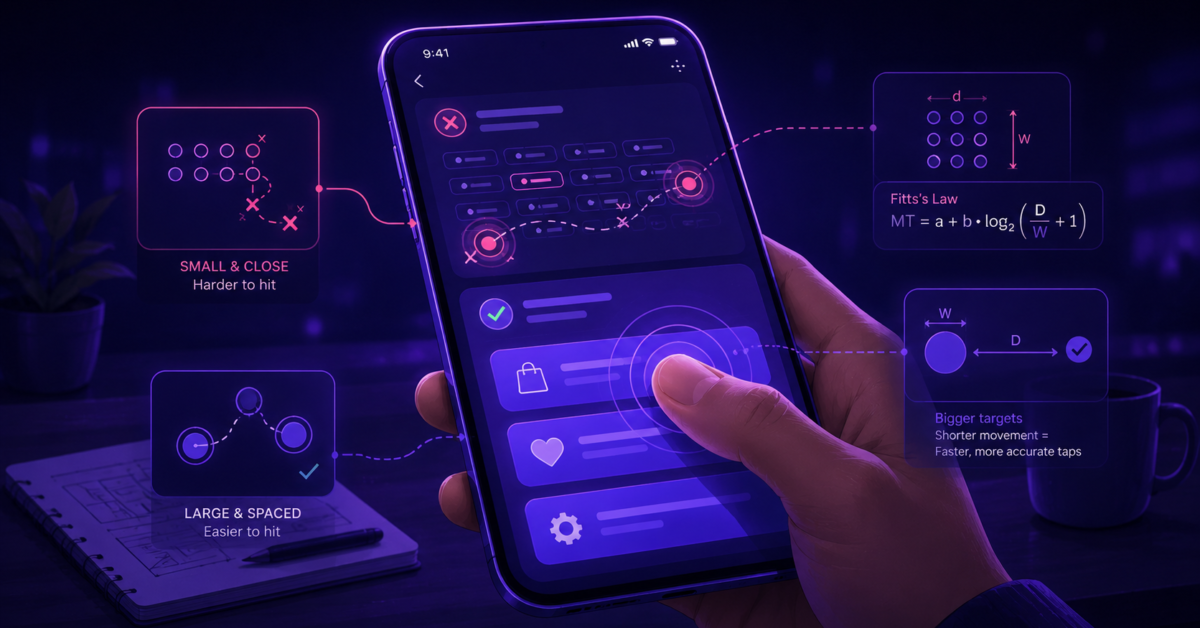
Fitts’s Law still works on mobile in its core claim, that bigger and closer targets are faster to hit, but the desktop habits built on top of it invert the moment a finger replaces a cursor. The clearest example is the corner. On a desktop the corner is the cheapest pixel on the screen to hit, and on a phone the most expensive, which is why the tiny close button placed there draws so many missed, repeated taps. Getting touch sizing right starts with knowing where those old instincts flip.
Fitts’s Law Predictions and the Model’s Original Scope
Paul Fitts published the law in 1954 after a tapping task that sounds quaint now. People moved a stylus back and forth between two metal plates as fast as they could, while landing inside the plate on at least 95% of taps. That accuracy constraint turns the result into a speed-accuracy tradeoff instead of a raw speed measure, which is what makes the law useful for design.
The model says movement time equals a + b * log2(2D / W), where D is the distance to the target and W is its width along the line of motion, with a and b fitted for a device and user. The log2(2D/W) term is the index of difficulty, counted in bits, treating the hand as a channel with limited capacity. Targets that are bigger and closer are faster to acquire, smaller and farther ones are slower and produce more errors, and the relationship is logarithmic, so doubling the distance does not double the time.
The law was validated heavily for the mouse, and it predicts mouse pointing almost perfectly, because a cursor is a single pixel with no occlusion. Moving the same rules to touch needs care.
The Breakdown of the Model on Touchscreens
A fingertip covers the target as it lands, so the user cannot see the precise point of contact, and the contact itself is an area, which standard Fitts treats as a point, so it under-predicts errors on small touch targets. A 2013 correction known as FFitts Law showed plain Fitts is insufficient for small-target acquisition with a fingertip. Its fix added a second source of spread, tied to the absolute precision of the finger, which has a floor no matter how slowly a person moves.
Below a certain size, slowing down stops helping, because the source of the imprecision is the finger’s contact patch and no longer the aim. A mouse button has no such limit, while a touch button has one that no amount of careful aiming removes.
Work from the MIT Touch Lab put the average adult index fingertip near 8 to 10mm wide, the finger pad at 10 to 14mm, and the thumb contact area near 25mm. Several common minimums are smaller than the pad that lands on them. A 44-point Apple target is about 7mm, so the part of the finger doing the tapping is wider than the thing tapped, which is why a practical floor near 10mm keeps coming back.
The Minimum-Size Numbers and Which to Trust
Platform Minimums Compared
The platform guidelines do not agree, and the spread is wider than most assume. Apple’s Human Interface Guidelines have called for a 44 by 44 point minimum since the 2007 iPhone guidance, and the number has held through current iOS. Points are not pixels, so at high density a 44-point control is many more device pixels than 44. Material Design asks for a larger 48 by 48 dp target plus at least 8dp of space between targets, around 9mm of physical screen, and Windows guidance is a notch lower near 7.5mm. The gap between the smallest and largest of these is real, and copying one platform’s number onto another screen is a common way to ship something too small.
The WCAG Numbers and the Legal Floor
A 24-pixel close control can pass an accessibility audit and still take a user three taps to hit. That outcome is built into the standards, which add a second pair of numbers that often gets confused with the platform minimums. WCAG 2.5.5, the enhanced criterion from 2018, asks for 44 by 44 CSS pixels, but is at Level AAA, which almost no legislation enforces. WCAG 2.5.8, added in 2023, asks for 24 by 24 CSS pixels at Level AA, the level that shows up under accessibility law. So the comfortable number is not enforced by law, and the enforceable one is about 6.4mm, smaller than the finger pad. Practitioners treat 24 pixels as a floor to exceed, since a control built to the bare minimum is compliant and frustrating at once.
The Usability Floor from Error-Rate Research
The number worth designing toward comes from error-rate studies. A 2006 study of one-handed thumb use, later given a best historical paper award, found that targets around 9.2 to 9.6mm kept error rates low, while anything under 7mm pushed errors up steeply. Usability guidance rounds this into the rule that interactive elements should be at least 1cm by 1cm, roughly the size at which mis-taps drop off.
The Diminishing Returns of Bigger Targets
Past about 1cm, accuracy gains flatten, and button-size studies put the efficient ceiling near 20mm, where the largest of 20, 25, and 30mm buttons mostly wastes screen space.
There is a stranger failure at the top end. When a target gets too large, people stop perceiving it as a discrete control, and a giant tap zone registers as a banner rather than a button. So the reflex that bigger is always safer fails past a threshold, because it trades a hit-accuracy problem for a perception problem. The work is finding the band where a target is easy to hit and still obviously a control.
The Corner Inversion and the Thumb Zone
On a desktop, screen edges behave as if they were infinitely deep. The cursor stops at the edge, so an edge target has effectively unlimited width along the approach, and a person can fling the mouse at it at full speed without overshooting. The four corners are better still, two infinite edges meeting at a point, so the macOS menu bar is on the top edge and the Windows Start button is in a corner.
None of that survives the move to touch. A finger does not stop at the screen edge the way a cursor does, so there is no overshoot protection, and bezels and gesture zones interfere. Worse, the top corners are the hardest region for a one-handed thumb to reach. The easiest spot to hit on a desktop is the hardest on a touchscreen, and the only thing close to a good edge on a phone is the bottom, which is inside the natural arc of the thumb. Tab bars and bottom navigation succeed there because a top-corner control is outside the thumb’s reach.
The Thumb Zone and Its Walk-Back
The thumb zone maps how easily a thumb reaches each part of a phone held in one hand, easy at the bottom and on the side opposite the thumb, hard at the far top corners. A field study of 1,333 observations found about 49% of people held the phone one-handed and roughly 75% used a thumb. That data became the reach heat map most designers met first, where only about a third of the screen counts as effortless.
The catch is that Steven Hoober, whose field study built the original map, later argued against treating it as fixed. Working from millions of captured touches, he found that people constantly change their grip rather than locking into one, and that they prefer to touch the center of the screen, where they tap fastest, and will move content there if a design lets them. The current reading favors designing for the center and making important controls repositionable. A designer who cites only the older map will get corrected.
The Misapplications Worth Fixing
A few patterns repeat often enough to name. The top-corner hamburger menu borrows a desktop habit and parks the entry point to navigation in the hardest spot for a thumb, then often opens a panel whose items are also up top. The tiny close X on a modal or ad combines the worst reach region with a target too small to hit cleanly, beside the content you least want to trigger, and few combinations produce more rage tapping. Treating the 24-pixel WCAG minimum as a usability target rather than a legal floor ships controls that pass review and annoy everyone. Target reworked its app in 2019 to enlarge the Search and Scan buttons to roughly 0.8 by 0.8 inches, explicitly to make it workable one-handed, and reported less frustration after.
Spacing as the Underrated Half of the Problem
Size has dominated the touch-target conversation for so long that spacing, the other requirement, gets treated as polish when it is a separate constraint. Material Design names 8dp between targets as a separate minimum, and a 48dp target with zero gap around it still fails in practice. WCAG 2.5.8 makes the trade explicit by letting a sub-24-pixel target pass if a 24-pixel circle centered on it does not overlap a neighbor, which formalizes the idea that small is fine when isolated.
The sharpest argument for spacing comes from people with hand tremors. For them, the danger is hitting a button by accident while scrolling, so they rest a finger in the gap between list items, trusting that the gap is dead space. Back-to-back targets with no gap remove that resting spot and turn a scroll into a run of accidental taps. Spacing is an accessibility feature that protects the users packed, undersized controls hurt most.
Fitts gives the design a floor and a map of bad regions, and stops there. The guidelines settle the minimum, the corner inversion marks where not to put things, and the thumb-zone research says to expect grip to change, but none of them name which control fails for which real grip on which device. A 44-point button your thumb hits without thinking can fall outside the arc of a smaller hand on a larger phone, and your own device is the worst place to learn that, since it reports only your own hand. Reviewing the layout in Evelance against personas with different thumb sizes and grips shows early which controls a one-handed user cannot reach, while the design is still easy to change. The sizes worth checking against are physical ones, a finger pad of 10 to 14mm meeting a 44-point control of about 7mm, with at least 8dp of space between targets, the gap that gives an unsteady finger somewhere safe to rest.
Frequently Asked Questions
What is the formula for Fitts’s law?
Movement time equals a + b * log2(2D / W), where D is the distance to the target, W is the target width along the axis of motion, and a and b are constants fitted for the device and user. The log2(2D/W) term is the index of difficulty, measured in bits. The relationship is logarithmic, so doubling the distance does not double the movement time.
What is the index of difficulty in Fitts’s law?
The index of difficulty is the log2(2D/W) portion of the formula, a single number in bits that captures how hard a target is to acquire based on its distance and width. A higher index means a harder and slower acquisition. It lets dissimilar targets be compared on one scale of difficulty rather than by raw size or distance alone.
Does Fitts’s law apply to touchscreens?
Partly. It still captures that bigger and closer targets are easier to hit, but it under-predicts errors on small finger targets because of occlusion and the finger’s contact area. The 2013 FFitts correction adds a fixed-precision term that models finger touch accurately, accounting for the floor below which moving slower no longer improves accuracy.
What is the minimum touch target size?
There is no single answer. WCAG 2.5.8 at Level AA sets a 24 by 24 pixel legal minimum, Apple recommends 44 by 44 points, WCAG 2.5.5 at Level AAA recommends 44 by 44 pixels, and Material Design recommends 48 by 48 dp. Usability research points to about 1cm by 1cm as a practical floor for low error rates.
How big is the average fingertip for touch design?
MIT Touch Lab research found the average adult fingertip is about 8 to 10mm wide, the finger pad 10 to 14mm, and the thumb contact area around 25mm. Several common minimum target sizes are smaller than the finger pad that lands on them, which is the physical reason occlusion and mis-taps happen on small controls.
What is the difference between Apple and Android touch target guidelines?
Apple’s Human Interface Guidelines specify a 44 by 44 point minimum. Google’s Material Design specifies a larger 48 by 48 dp minimum plus at least 8dp of spacing between targets. Material is the more generous of the two, and its separate spacing requirement means a target can meet the size rule and still fail if it has no gap around it.
What is the thumb zone in mobile design?
The thumb zone is the area of a phone screen a person can comfortably reach with their thumb while holding the device one-handed. It is easiest at the bottom and on the side opposite the thumb, and hardest at the far top corners. Later research complicates it, since people change grip often rather than holding the phone one way the whole time.
Is bigger always better for touch targets?
No. Accuracy improves with size only up to about 1cm, after which the gains flatten. Oversize targets waste screen space and can stop registering as discrete, clickable buttons, so a giant tap zone may be mistaken for a banner or background instead. There is a usable sweet spot rather than a rule that bigger is always safer.
How much space should there be between touch targets?
Material Design recommends at least 8dp of spacing between targets, and WCAG 2.5.8 lets smaller targets pass if a 24-pixel circle around each one does not overlap a neighbor. Spacing is a separate requirement from size. Adequate gaps prevent accidental activation, which matters most for people scrolling past tightly packed controls.
Why do screen corners matter in Fitts’s law?
On desktop, screen edges and corners act as effectively infinite targets because the cursor stops at them, so they are easy to hit at full speed. This is why the macOS menu bar is on the top edge and the Windows Start button is in a corner. The advantage does not transfer to touch, since a finger does not stop at the edge.
Where should the navigation menu go on mobile?
Toward the bottom of the screen, inside the natural arc of the thumb. Placing the hamburger or primary navigation in a top corner forces a regrip and puts it in the hardest region for a one-handed thumb, which is a common Fitts’s Law misapplication on mobile. Bottom navigation and tab bars solve this because they are where the thumb already rests.
What is the difference between Fitts’s law and Hick’s law?
Fitts’s Law concerns the physical motor cost of reaching a target, based on its size and distance. Hick’s Law concerns the cognitive cost of choosing among options, where decision time grows with the number of choices. Fitts governs the reach toward a target, while Hick governs the decision a person makes first. The two get cited together because both shape the same tap, though one measures movement and the other choice.