

 Dec 20,2025
Most product teams know they need to talk to users. Fewer know which method to use, when to use it, or how to interpret what they find. The result is often a scattered approach where research happens sporadically, findings sit in slide decks nobody reads, and design decisions still get made based on whoever argues loudest in the room.
Research methods are tools. A hammer works well for nails, poorly for screws. The same logic applies here. Usability testing tells you where people struggle. Surveys tell you what people say they want. Card sorting tells you how people organize information in their heads. Each method answers a specific question, and picking the wrong one wastes time and budget while producing data that misleads rather than informs.
Nielsen Norman Group maps 20 research methods across three dimensions and product development stages, noting that the field has grown from lab-based usability testing to include unmoderated assessments, predictive tools, and behavioral analytics. The key is matching the method to your current question.
This list covers 10 methods worth knowing. Some are fast. Some are slow. Some require participants, others require only observation. All of them work when applied correctly.
| # | Research Method |
|---|---|
| 1 | Usability Testing Watch real people attempt real tasks with your product and note where they struggle. 5 participants typically reveal 80% of usability problems. Moderated sessions allow follow-up questions; unmoderated sessions scale better. |
| 2 | User Interviews Collect perceptions, motivations, and mental models directly from users. Ask about past behavior rather than hypothetical future actions. Works well for early-stage research when understanding the problem space. |
| 3 | Surveys Collect self-reported data from large samples. Answers “what” and “how many” questions well. Answers “why” questions poorly. What people say they do and what they actually do are often different. |
| 4 | Card Sorting Reveals how users expect information to be organized. Participants group topics into categories that make sense to them. Results inform navigation structure, menu labels, and content organization. |
| 5 | Journey Mapping Visualizes the process a person goes through to accomplish a goal. Plots stages, touchpoints, emotions, and pain points across a timeline. Forces teams to see full context rather than isolated interactions. |
| 6 | Empathy Mapping Captures what users say, think, do, and feel about a topic. Works best as a synthesis exercise after interviews or observation sessions. Reveals gaps in existing user knowledge and aligns teams. |
| 7 | Five-Second Testing Measures first impressions. Show users a design for 5 seconds, then ask what they remember. Reveals what visual elements attract attention and whether users can quickly identify page purpose. |
| 8 | First-Click Testing Tracks where users click first when attempting a task. Users who click correctly first complete tasks 87% of the time. Users who click incorrectly first succeed only 46% of the time. |
| 9 | Preference Testing Shows users two or more design options and asks which they prefer. Limitation: preference does not equal usability. Use for visual design decisions where options are functionally equivalent. |
| 10 | Analytics Review Your product already generates behavioral data. Page views, click rates, session duration, and feature usage show what users do. Complements other methods because data rarely shows why they do it. |
| BONUS | Predictive Research with Evelance Skip recruitment, scheduling, and incentive costs. Upload a live URL or design file, select from 1.8M+ predictive personas, and receive psychology scores with prioritized recommendations in minutes. Validated at 89.78% accuracy against real human responses. Teams report finding 40% more insights when live sessions explore pre-validated designs. Use for initial screening, rapid iteration, and testing hard-to-reach audiences like cardiac surgeons or rural demographics. |
1. Usability Testing
Usability testing remains the most effective method for improving an existing system. You watch real people attempt real tasks with your product, note where they struggle, and fix those problems. The method produces observable behavior rather than self-reported opinions, which makes the findings harder to dismiss.
Moderated testing involves a facilitator guiding participants through tasks while asking them to think aloud. Unmoderated testing uses software to record sessions without a facilitator present. Both approaches work. Moderated sessions allow follow-up questions. Unmoderated sessions scale better and cost less per participant.
For qualitative studies, sample size depends on three factors: the variety within your target group, your research scope, and the researcher’s skill level. Five participants typically reveal 80% of usability problems, though complex products with varied user types need more.
2. User Interviews
Interviews collect perceptions, motivations, and mental models directly from users. They work well for early-stage research when you need to understand the problem space before designing solutions. They work poorly for evaluating usability because people cannot accurately describe their own behavior.
A 30-minute interview with a well-prepared script produces more useful data than an hour of unfocused conversation. Ask about past behavior rather than hypothetical future actions. “Tell me about the last time you did X” yields better answers than “Would you ever use a product that does Y?”
Interviews are fast and easy, which explains their popularity. Use them to learn about user perceptions, not to validate design decisions.
3. Surveys
Surveys collect self-reported data from large samples. They answer “what” and “how many” questions well. They answer “why” questions poorly.
Good surveys are harder to write than most teams assume. Questions need to be unambiguous. Response options need to cover all possibilities without overlapping. The order of questions influences responses. Leading phrasing biases results.
Test your survey with three methods before launching. Cognitive walkthroughs check question clarity with target users. Mechanical tests ensure software functions like skip logic work correctly. Usability tests observe how real users interact with the survey itself.
Surveys should not replace behavioral methods. What people say they do and what they actually do are often different things.
4. Card Sorting
Card sorting reveals how users expect information to be organized. You give participants a set of topics on cards and ask them to group them into categories that make sense. The results inform navigation structure, menu labels, and content organization.
Open card sorts let participants create their own category names. Closed card sorts provide predetermined categories and ask participants to sort items into them. Open sorts work better for discovering user mental models. Closed sorts work better for validating a proposed structure.
This method catches organizational problems before they become expensive to fix. A poorly organized product forces users to hunt for features. Card sorting reveals the organization that matches user expectations rather than internal company structure.
5. Journey Mapping
A journey map visualizes the process a person goes through to accomplish a goal. It plots stages, touchpoints, emotions, and pain points across a timeline. The output helps teams see the full context of user actions rather than isolated interactions with a single feature.
Journey maps require research to build. They should not be based on assumptions. Interview users about their process. Observe them completing tasks. Map what you find rather than what you hope is true.
The exercise forces teams to consider moments before and after product interaction. Users do not exist only while using your product. Their goals extend beyond your interface, and understanding that context changes design priorities.
6. Empathy Mapping
Empathy maps capture what users say, think, do, and feel about a topic. The format is a simple quadrant that teams fill in collaboratively based on research findings. The process reveals gaps in existing user knowledge and aligns team members on a shared view of user needs.
This method works best as a synthesis exercise after interviews or observation sessions. It does not replace primary research. Teams that fill empathy maps with assumptions instead of data produce misleading artifacts that feel authoritative while being entirely fictional.
The output should prompt questions. If a quadrant is empty, you have a gap in your research. If team members disagree about what belongs in a quadrant, you need more data to resolve the conflict.
7. Five-Second Testing
Five-second testing measures first impressions. You show users a design for 5 seconds, then ask what they remember. The method reveals what visual elements attract attention and whether users can quickly identify the page purpose.
This works well for landing pages, marketing materials, and any design where first impressions determine engagement. It works poorly for complex interfaces that require exploration to understand.
The limitation is that 5 seconds is artificial. Real users spend more time with designs. But initial perception shapes subsequent interaction, and this method isolates that initial moment for evaluation.
8. First-Click Testing
First-click testing tracks where users click first when attempting a task. Research shows that users who click correctly on the first try complete tasks successfully 87% of the time. Users who click incorrectly on the first try succeed only 46% of the time.
The method reveals whether your navigation and layout guide users toward correct paths. It identifies misleading labels, confusing icons, and organizational problems that send users in wrong directions.
You can run first-click tests on prototypes before building anything. This catches problems early when changes are cheap. Running the same test on live products provides baseline data for measuring improvement after redesigns.
9. Preference Testing
Preference testing shows users two or more design options and asks which they prefer. The method collects opinions about visual design, layout, and overall appeal.
The limitation is that preference does not equal usability. Users often prefer designs that perform worse in task completion. A visually appealing layout may obscure important controls. Use preference testing for visual design decisions where both options are functionally equivalent, not for choosing between designs that differ in structure or functionality.
Combining preference testing with usability testing provides a fuller picture. You learn which design users prefer and which design performs better. When those differ, you have data to support a design choice over stakeholder opinions.
10. Analytics Review
Your product already generates behavioral data. Page views, click rates, session duration, feature usage, search queries, and support tickets all reveal how people actually use your product. This data shows what users do. It rarely shows why they do it.
Analytics complement other research methods rather than replacing them. High drop-off on a specific page tells you something is wrong. It does not tell you what. You need qualitative research to explain the quantitative patterns.
Nielsen Norman Group notes that data from call logs, searches, or analytics is not a great substitute for talking to people directly. Data tells you what happened. You often need to know why.
Evelance: Predictive Research That Accelerates Traditional Methods
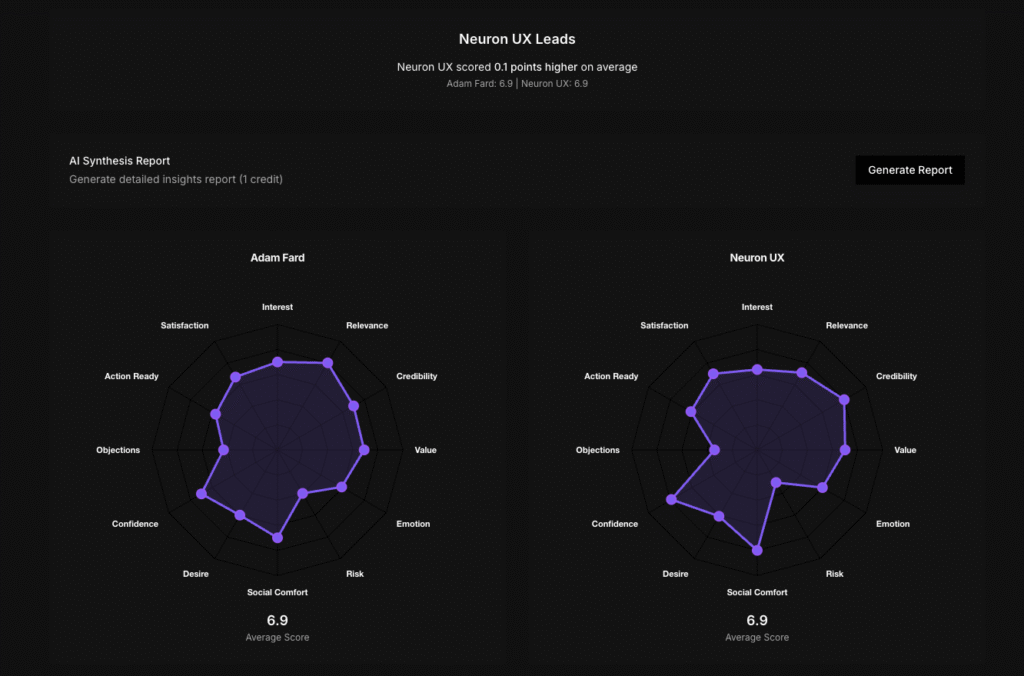
Recruiting research participants takes time. Scheduling sessions across time zones takes more time. Incentive costs add up. These logistics slow research cycles and limit how often teams can test designs.
Evelance approaches this problem differently. The platform uses predictive personas to simulate user reactions without recruitment, scheduling, or incentives. You upload a live URL or design file, select a target audience, and receive psychology scores, persona narratives, and prioritized recommendations within minutes.
The platform maintains over 1,800,000 predictive personas covering consumer and professional profiles. You filter by life context, job type, technology comfort, and behavioral patterns. Tests complete faster because there is no outreach or participant management involved.
Accuracy has been validated through testing. Evelance ran parallel evaluations comparing 23 real people with 7 predictive personas reviewing AirFocus, a roadmapping tool. Both groups flagged the same concerns. Both mentioned Jira integration as their first connection to the product. Both questioned what AI-powered actually meant. Both expressed hesitation about learning another tool. The predictive models matched real human responses with 89.78% accuracy.
This does not mean you skip talking to real users. Evelance is as an augmentation tool, not a replacement. The platform handles volume testing and rapid validation while your team runs in-depth sessions on pre-validated designs. Teams report finding 40% more insights when live sessions explore pre-validated designs rather than discovering fundamental problems during expensive sessions.
The cost difference is substantial. Traditional research costing $35,000 and taking 6 weeks can be compressed to under an hour. For the 29% of research teams operating with less than $10,000 annual budget, this changes what is possible. That budget funds 2 moderated studies at traditional rates. Through predictive testing, the same budget enables monthly validation cycles.
Evelance also reaches audiences that traditional recruitment struggles to access. Cardiac surgeons, rural farmers, or a diabetic single father can be modeled without recruitment barriers. Teams test 20 variations in an afternoon and get feedback from profiles they cannot afford to recruit through traditional panels.
The recommended use cases are initial screening, rapid iteration, accessibility checks, and testing with hard-to-reach audiences. Teams screen concepts before booking participants, test iterations between scheduled sessions, and validate fixes while waiting for recruitment. Predictive testing catches basic usability issues so that participants in live sessions focus on sophisticated feedback.
Matching Methods to Questions
Every research method answers specific questions well and other questions poorly. The decision of when to conduct user research has a simple answer: conduct research at whatever stage you are in right now. The earlier you research, the more impact findings have on your product.
Some methods suit different constraints. Time-limited projects benefit from unmoderated testing and analytics review. Early-stage products need interviews and journey mapping. Mature products need usability testing and preference testing. Complex information architectures need card sorting.
Using different or alternating methods is recommended in each product cycle because they aim at different goals and produce different types of insight. Usability testing alone misses user motivations. Interviews alone miss actual behavior. Combining methods builds a fuller picture of who your users are and what they need.
Making Research Part of the Process
Research that happens once a year produces outdated insights. Research that happens continuously keeps products aligned with user needs. The goal is building research into regular development cycles rather than treating it as a separate phase that delays shipping.
The combination of traditional methods and predictive tools like Evelance makes continuous research practical for teams with limited budgets and tight timelines. Run predictive tests during sprint planning. Schedule moderated sessions monthly. Review analytics weekly. Each method contributes different data, and the combination produces understanding that no single method provides alone.
User research methods are the tools that connect design decisions to user needs. Pick the right tool for your current question, apply it correctly, and act on what you find.